Scan bills, receipts, and documents to auto-capture data into your Vyapar account. Save time, reduce errors, and boost productivity instantly! Try a Free trial Now!
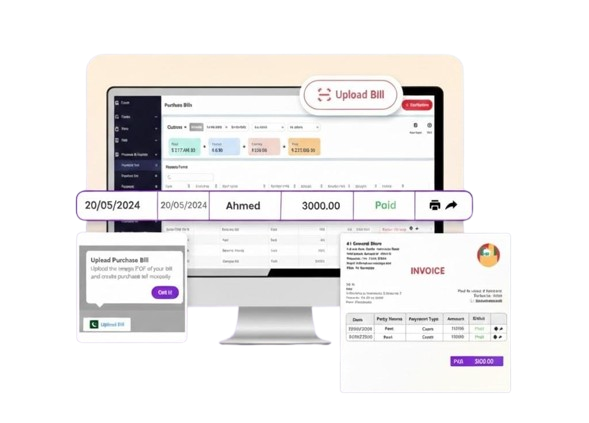
Bills Auto Scanned
Data Accuracy
Minutes Saved Daily
Devease OCR tool blends intelligent automation with ease, built for growing businesses that want to digitize their billing and documentation effortlessly.

Easily scan paper bills or receipts using OCR application and extract vendor details, item, price, and tax details instantly.

Convert scanned documents into purchase entries with just one tap—no manual typing required.

Devease OCR automatically reads and fills GSTIN, HSN/SAC codes, and tax breakdowns from the scanned invoice.

Each scanned document is attached to its transaction and automatically recorded in reports like Purchase Summary, GST Reports, and Expense Reports.
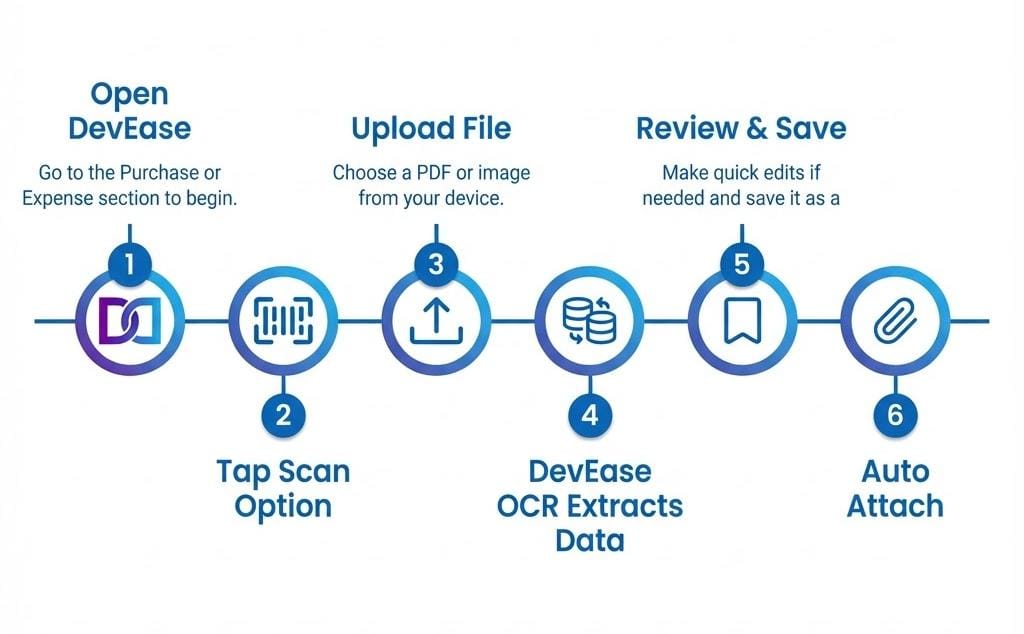
No more manual data entry or typos. Devease OCR automatically extracts data from your documents with 99.9% accuracy.
Join thousands of businesses saving time and reducing errors with Devease OCR technology
Yes, after OCR scans the document, you can manually review and edit any fields before saving.
As of now, OCR works best with documents in English. Support for regional languages may come later.
Devease Digital OCR can scan purchase printed bills, supplier invoices, and expense receipts.
OCR is available in the premium version of Vyapar. You’ll need an active subscription to access this feature.
Currently, OCR supports single-page scans per entry. For multi-page invoices, you can upload them one by one or attach all pages manually.
Devease Digital OCR supports JPEG, PNG, and PDF formats when uploading documents from your device for scanning.
Yes, OCR requires an active internet connection as the document is processed on Devease digital secure servers for accurate data extraction.

Billing Accounting & Inventory software for small business owners in Pakistan
DevEase Digital is a Business Accounting Software built for Pakistan small businesses to deal with invoicing, inventory, accounting needs, and much more! The goal is to make a businessman’s daily routine less tiring.
+92 333 3333333
example@email.com
pakistan